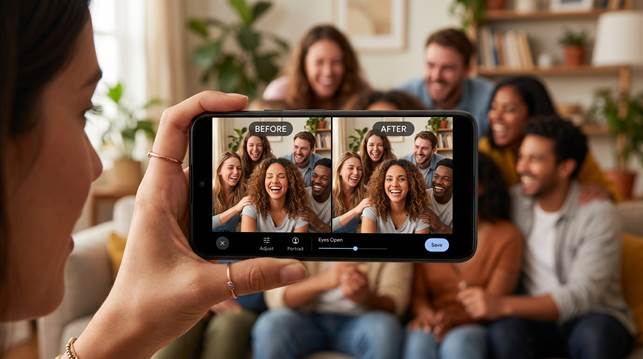
Learn the best way to fix closed eyes in group photos on Android with Relumi. Use an AI eye opener workflow to open eyes in picture naturally while keeping lighting, skin tone, and the group mood consistent.
A group photo can feel perfect until one person blinks at the wrong moment. This guide explains how to fix closed eyes in photo on Android, why natural eye repair matters so much in group shots, and how an AI workflow can help you save the moment without making the image look edited.
Group photos are hard to get right because so many things have to align at the same time. Everyone needs to look toward the camera, the smiles need to feel natural, the framing has to work, and the timing has to land at exactly the right second. That is why it feels so frustrating when the whole shot looks great except one person blinked. The moment was there, but one small detail makes the image feel unfinished.
This problem feels even worse on Android because many group shots happen fast. You take them at dinner, during travel, at parties, after events, or in the middle of a busy day when people do not want to stop and pose again. You need a practical way to fix closed eyes in photo without carrying the whole image into a long desktop editing process. You also need the result to look natural enough that nobody notices the repair at all.
Part 1. Why closed eyes matter so much in group photos
In a solo portrait, a blink can ruin your own expression. In a group photo, it affects the feeling of the whole image. The eye goes straight to the person who looks off, even when every other face looks good. That means one closed pair of eyes can pull attention away from the smiles, the location, and the mood of the group.
The emotional part matters too. Group pictures often capture moments you cannot repeat. A family gathering ends. A trip moves on. A celebration finishes. Friends separate after the event. When one person blinks in the best frame, you do not just lose a nice photo. You risk losing the version of the memory everyone actually wanted to keep.
Part 2. What makes eye repair look natural instead of fake
A believable repair has to do more than open the eyelids. It needs to respect the shape of the eyes, the direction of the gaze, the angle of the head, and the light on the face. In a group photo, this matters even more because the repaired face has to stay in harmony with the people around it. If the edit looks too sharp, too bright, or emotionally disconnected, the result starts to feel strange right away.
That is why a good AI eye opener works best when it understands the face as part of the whole scene. The skin tone should stay consistent. The shadows should still make sense. The expression should still feel like the same person in the same moment. When those pieces stay aligned, the repaired photo feels less like an edit and more like the shot you meant to capture in the first place.
Part 3. Why Relumi works so well on Android
When you look at Relumi for this problem, the biggest advantage is that the edit is designed to protect the original portrait logic. Relumi analyzes face structure, eye state, pose, and lighting so the repaired result stays closer to the real moment instead of looking copied or artificial.
That matters when your goal is to fix closed eyes in photo without damaging the group atmosphere. In a strong group image, you are not trying to redesign the whole picture. You are trying to repair one detail so the full memory feels complete again.
If you want to open eyes in picture naturally with an AI eye opener the mobile workflow is a major benefit. You can work directly on Android, preview the result before saving, and keep the repaired face visually consistent with the people around it.
The product pages also highlight strengths that matter for this workflow, including AI Retake, one tap repair, preview before saving, and support across major Android brands such as Samsung, Huawei, and Xiaomi. That makes the process easier to trust because you can work directly on your phone instead of moving files around and hoping the edit still feels natural at the end.
This mobile advantage matters most when the group photo carries emotional weight. You do not want to leave a family picture broken just because one face blinked. You want a quick way to open eyes in picture while protecting the warmth, lighting, and shared feeling of the scene. That is exactly where a cleaner Android workflow feels valuable.
Part 4. How to fix closed eyes in a group photo on mobile
If you want a simple mobile process, Relumi gives you a clear model to follow. You open the tool, choose the image, let the app process the face naturally, then preview the result before saving it. The steps are simple, but they solve a problem that often makes group memories feel unusable.
Step 1. Open the app and start the AI retake workflow
This is the first step when a group photo already feels special but one face ruins the result. If the smiles, lighting, and background all look good, opening the app gives you a realistic chance to save the photo instead of asking everyone to pose again.

Step 2. Select the group photo that needs eye repair
Choosing the right image matters because most people are not trying to rebuild the whole shot. You are usually trying to rescue one strong group moment where one person blinked, looked half asleep, or missed the exact second the photo was taken.

Step 3. Let AI retake process the face naturally
This step matters because eye repair is not only about opening eyelids. The edited face still has to match the original pose, lighting, skin tone, and the natural feeling of the group scene. That is what makes the result look believable instead of patched together.

Step 4. Preview the repaired image and save it
A good result should feel like the same group photo on a better second, not a strange replacement. This final review helps you make sure the repaired eyes still match the mood, expression, and energy of the people around them before you save the image.

Part 5. When this repair matters most
Family photos are one of the clearest examples. You may only get one moment where everyone is sitting together, looking toward the camera, and smiling in a way that feels real. If one person closes their eyes, the whole image can feel like a missed chance. A natural repair helps you keep the full memory instead of settling for a second choice photo that has less feeling.
Travel and event shots also benefit from this kind of edit. On Android, these are often quick phone photos taken in crowded places or fast moving moments. You cannot always stop the group and ask for another attempt. When one blink is the only problem, a careful repair becomes much more practical than giving up on the image.
Friend group selfies, class photos, team pictures, and work images are also common use cases. In these situations, you may not need a heavy beauty edit or a dramatic retouch. You only need the face to look awake and connected so the whole group photo feels complete. That is what makes a focused eye repair much more useful than broad editing for this kind of problem.
Quick comparison: what a good group photo repair should protect
| Group photo situation | What usually goes wrong | What a better repair should do |
|---|---|---|
| Family dinner or holiday photo | One person blinks in the best frame | Keep the whole group shot and repair the eyes naturally |
| Travel group photo | You cannot gather everyone again | Save the memory without changing the scene |
| Friends selfie on Android | The group energy is right but one face looks off | Preserve the fun while fixing the weak detail |
| Work or school group picture | One person loses eye contact | Make the portrait feel polished and usable |
When those details stay balanced, the result does not feel manipulated. It simply feels like the better version of the group photo you hoped you had already captured.
Conclusion
If you want the best way to fix closed eyes in group photos on Android, the real goal is not just changing one feature on one face. The real goal is saving the full group moment without breaking its natural mood. That is why a good repair has to preserve lighting, skin tone, expression, and the shared feeling of the scene.
For users who want to fix closed eyes in photo, open eyes in picture naturally without a difficult workflow, Relumi offers a strong mobile option. It gives you a practical way to rescue group memories, keep the image believable, and save the photo you actually wanted to keep all along.